
How to Move a Live Property Launch Off a Spreadsheet

Key Takeaways
- The minimum migration is one change: new leads enter the CRM while existing deals close out in the spreadsheet.
- Current unit data belongs near the front of the queue because it anchors availability and deal records.
- Contacts and live deals are worth adding only when their value exceeds the cleanup and transfer risk.
- Full historical import returns the least value per hour and should never delay the operational switch.
A sales lead at a client, three weeks from a launch, showed me the migration plan her CRM vendor had sent her. It began with cleaning every contact in a spreadsheet that went back nine years, mapping every column, training everyone, and picking a quiet weekend for the cutover. There was no quiet weekend in her calendar, and while the plan waited for one, new enquiries from the teaser campaign were going into the same spreadsheet, on a tab somebody had called new leads 2, next to the one called new leads. She asked me what the smallest version of the migration was that would protect the launch.
The smallest version is an operational switch. Move every new enquiry into the CRM from one named cutover time. Leave active spreadsheet deals where they started unless moving one has a clear payoff. Load the current inventory early so availability, leads and deals refer to the same units. Nothing historical needs to move before the new workflow starts.
Route new leads to the CRM from one named time
That vendor plan is the usual one, and its problem is bigger than the missing weekend. It delays the changes that matter today: keeping new inquiries in one place and linking sales work to current unit availability.
Split the work by deal age. From the cutover time onward, the CRM owns every fresh inquiry. Deals already being worked remain in the spreadsheet until they close or become worth moving. The old file stays available, but it stops receiving new rows. That boundary is simple enough for the sales desk to remember and strict enough to stop the spreadsheet from winning by habit.
Week one succeeds through habit change. Data cleanup runs beside it. One sales owner should check each day that new inquiries reached the CRM, agents stopped adding fresh rows to the sheet, and every exception has a named person fixing it. A second system may remain open for old deals. It must never become an optional route for new ones.
The cutover rule
- Send every new lead to the CRM.
- Freeze new entries in the spreadsheet.
- Transfer an old deal when future CRM work can repay the transfer risk.
What the unit import changes on the sales floor
The first addition is the current unit inventory. Vinode's Back Panel manages unit data, pricing, availability, galleries, attributes, and groups such as buildings. Its CRM connects contacts and deals to the units buyers viewed or asked about. Importing units early gives those activities one inventory to refer to.
The cleanup still matters. Unit IDs must be stable. Status values such as Available, Reserved, and Sold need one meaning. Buildings and floors need consistent labels. Test those rules on a small sample before moving the full current list. A clean contact database beside an unreliable unit list is not a safe launch system.
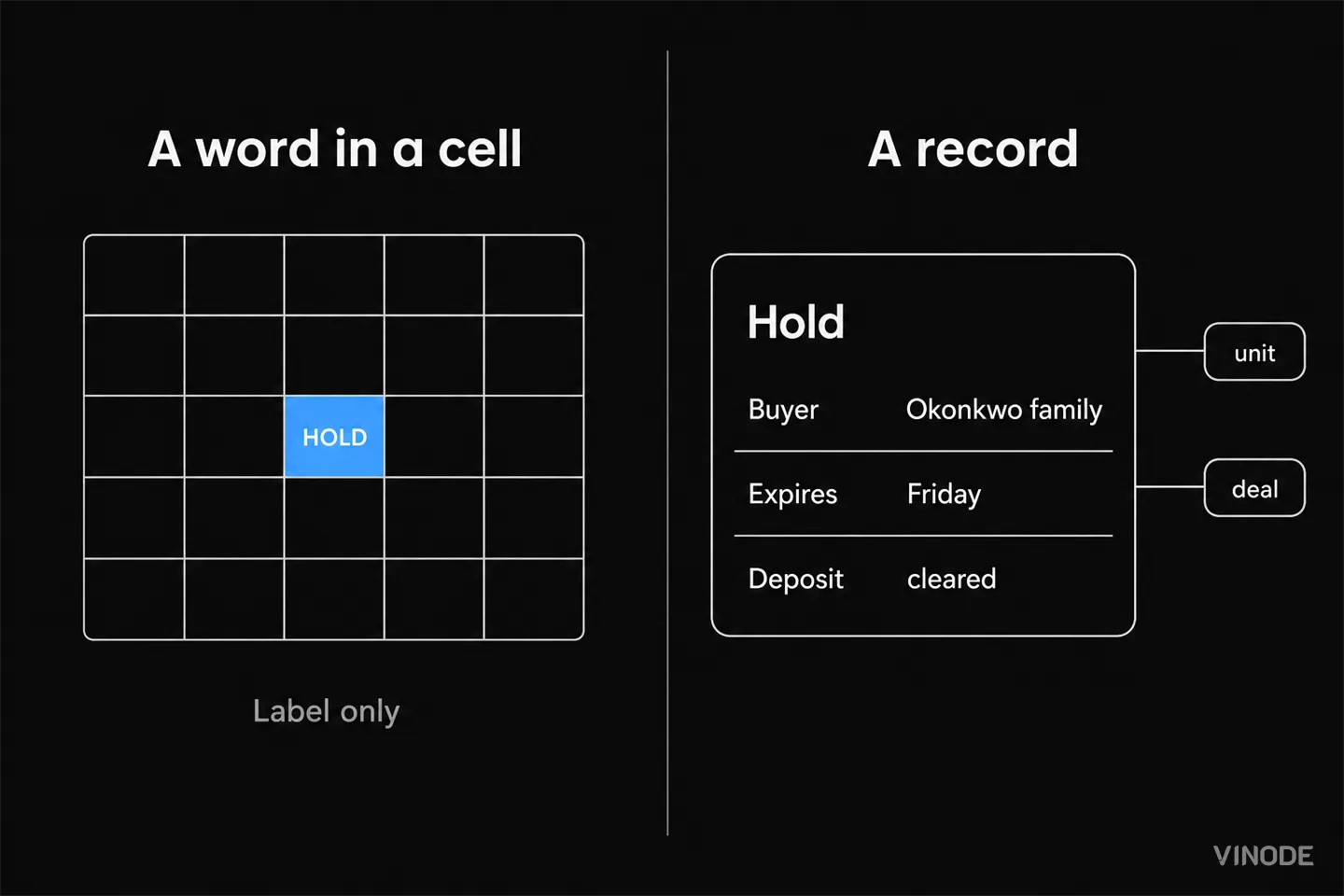
Vinode's Back Panel also gives the team deal stages, activities, tasks, reminders, and consent controls. Those features become useful only when the records under them are current. We think contact-first migrations reverse the useful order. They can make the database look populated while leaving the sales floor dependent on the old availability sheet. During a live launch, the inventory deserves attention first.
Why contacts wait until the team agrees on which fields to keep
The second addition is contacts. Here the cost curve changes. Contact sheets collect years of human inconsistency: names split differently, phone prefixes missing, dates written in several formats, and source values such as Instagram, IG, social, and referral mixed in one column.
The Back Panel stores customer details, source, consent, viewed units, and sales activity. Before moving contacts, decide which fields the team will keep accurate. Then define what blank, unknown, and duplicate mean. Two similar records may represent one buyer using a work email and a private phone, or two relatives buying together. Software can flag a possible match. A person who understands the relationship should decide whether to merge it.
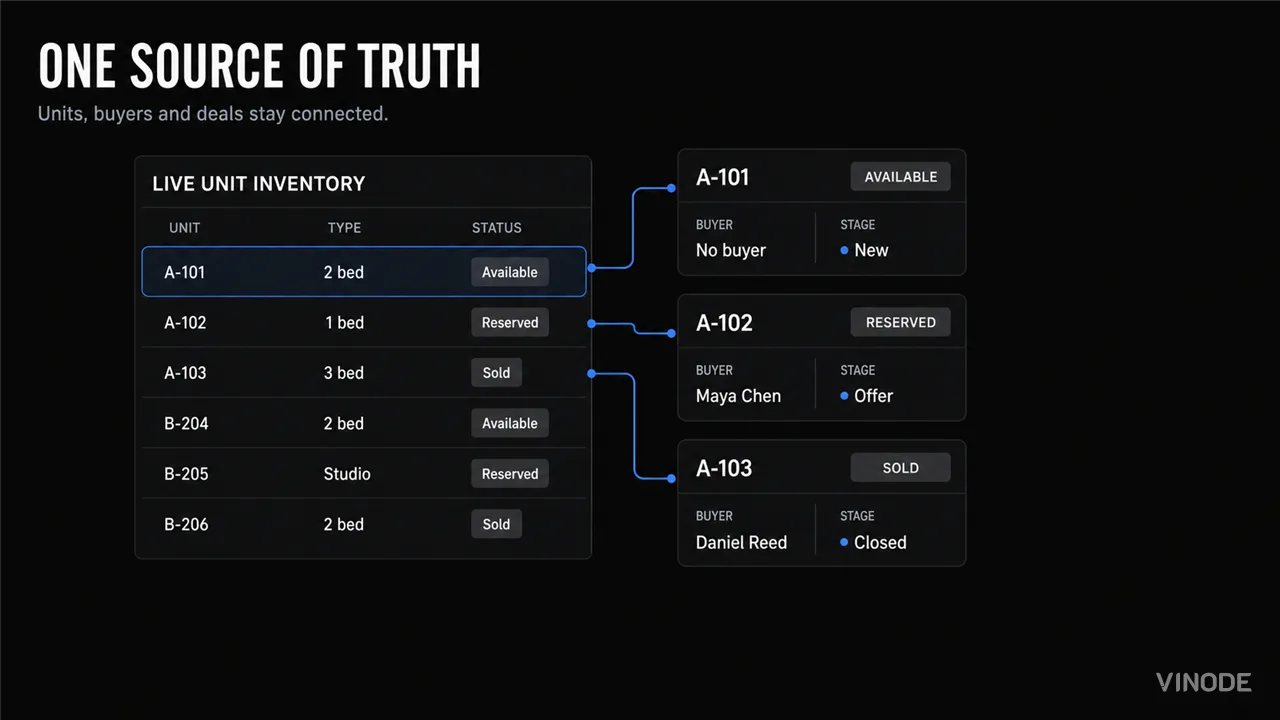
The contact import also buys a trace from a lead submission to the contact, deal, and unit concerned. Vinode forms can send submissions into the CRM and link them to contacts. The Back Panel can then carry the source through the sales pipeline.
Marketing teams often use UTM tags, which are short campaign labels added to a link, to identify the channel or campaign behind a visit. Those labels are useful context. They will not settle every commission dispute. A buyer can meet an agent offline, return through an ad, and use a different email. Attribution preserves evidence of a path. It cannot rule on commercial ownership by itself.
In-flight deals and the close-date cutoff
The third addition is the in-flight deal. Move it only when the remaining life of the deal justifies another handling step. A reservation close to completion gains little from a transfer and carries a real risk of a missed note, owner, or deadline. A deal with substantial work left can benefit from CRM stages, tasks, reminders, unit links, and attribution long enough to repay the effort.
Use a written cutoff rule. Expected close date is a good start, then add exceptions for disputed ownership, missing consent, or any deal whose record is already unclear. Do not let each agent improvise. The transfer itself should have an owner, a validation check, and a final note in the old row that names the new record.
What to move now
Move
New leads, active unit inventory, and deals with enough remaining life to benefit from stages, tasks, and linked buyer context.
Leave for now
Deals closing soon, ambiguous records that need human review, and old contacts with no current purpose.
One system should own every new lead
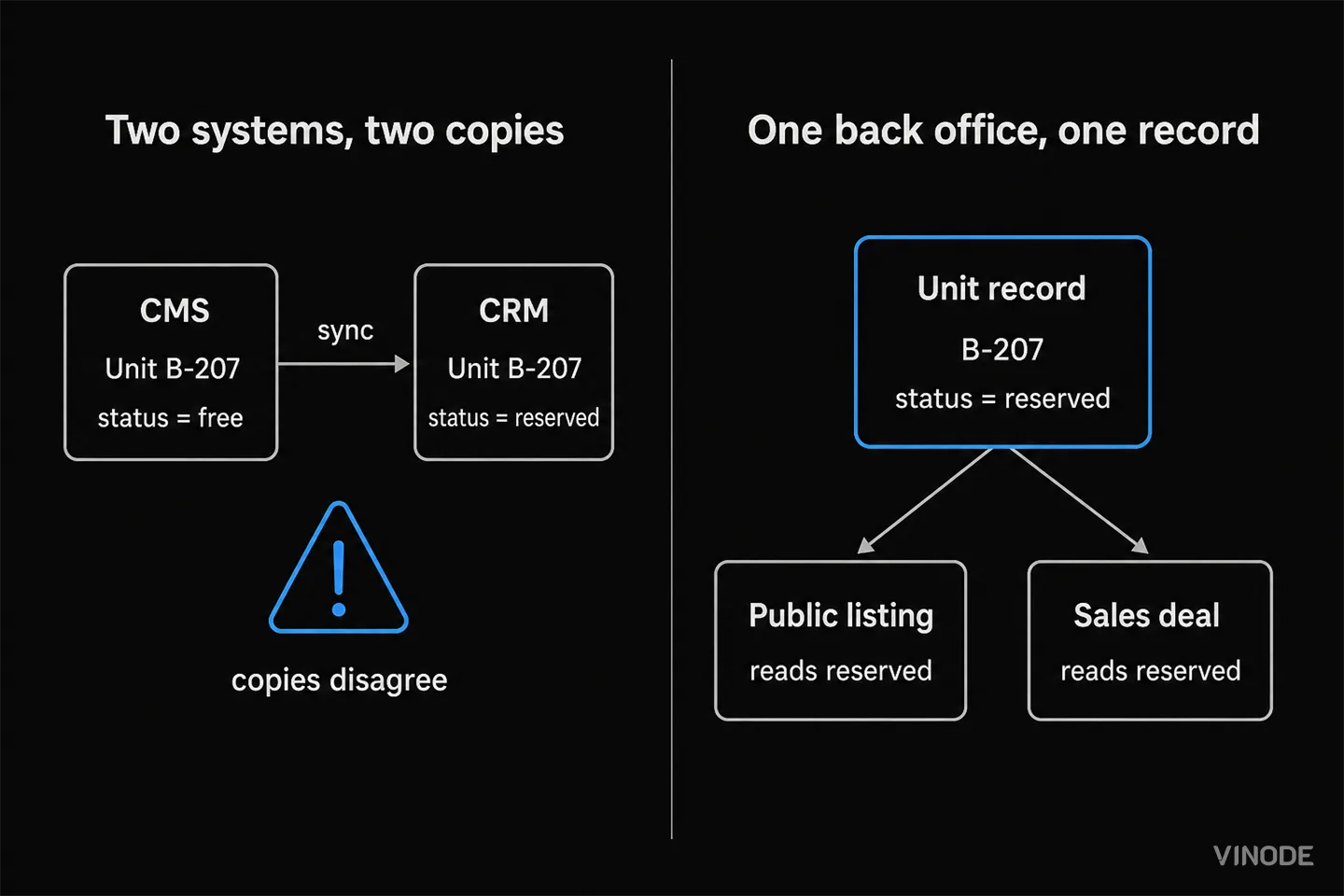
Two systems are safe only when each has a separate job. If agents enter the same new lead in both, the records can disagree. The CRM should own everything new. The spreadsheet should contain only the old pipeline that has not moved.
Validate each transfer before it changes daily work. Compare record totals. Open sample contacts, units, and deals. Check owners, statuses, consent, and links between buyers and units. Record anything rejected or unclear, then give it to one person to resolve. Validation should produce a short exception list with clear outcomes.
Who owns the CRM cutover and what sets its timing
A useful cutover plan has a commercial owner and a technical owner. Your sales lead owns the cutover time, unit-status meanings, deal cutoff, required contact fields, and the week-one rule for agents. The technical owner handles mapping, configuration, integration, test imports, and the rollback plan. Both sign off on a sample before the live workflow changes.
A day count from data volume alone would be a guess. Timing also depends on the quality of the source inventory, the number of contact formats, consent gaps, integrations, and how many active deals need manual review. Vinode publishes delivery times for complete product packages. A CRM migration needs its own schedule. Pricing is also scoped to the development. Ask for a custom quote based on project size, existing assets, and required work.
Cutover ownership
Sales lead
Sets the cutover time, field meanings, deal cutoff, and week-one rule.
Technical owner
Maps the data, configures the system, tests the transfer, and prepares rollback.
Both
Approve sample records and assign every exception before the switch.
Do not stage the cutover during a legal freeze, an ownership dispute, or a data incident. A tiny team with a handful of units and one editor may also gain too little from migration during the current launch.
Full historical CRM import should not delay the cutover
The final addition is historical data, and this is where the return often turns negative. Old contacts need the same careful decisions as current contacts, but many will not support current sales work. Closed deals can matter for finance, warranty, or legal retention, yet that does not mean they belong in the live sales workflow. An export stored under the right retention policy may be the better archive.
There is a broader distinction here between preserving memory and running today's operation, and one system does not need to do both jobs. Historical import earns its place only when a named team has a named use for the records, such as service, audit, or campaign analysis. Without that use, keep the export, document where it lives, and stop cleaning.
The migration is done before every row has a new home
Most projects should stop after new leads, units, contacts needed for current work, and selected in-flight deals are operating in the CRM. Most projects instead stop moving because the archive is not perfect.
Choose the operational boundary first. Name the exact time after which every new lead belongs to the CRM. Import units before broad contact history. Move live deals by a written payoff rule. Then let the spreadsheet shrink as its old pipeline closes. The migration is done when the team no longer needs the sheet for today's sale. Old rows can stay in a documented archive. The sales lead with the nine-year spreadsheet launched on the CRM with three weeks' notice and an archive she still has not cleaned, and the launch did not need her to.
Plan the smallest useful cutover
See how Vinode connects unit inventory, leads, deals, tasks, and attribution in one Back Panel.


AI Property Imagery in 2026: A Trust and Governance Playbook for Developers
A label tells buyers that AI touched an image. It cannot tell your team which design revision supports the image, who approved its claims, where it is live, or how to withdraw it.
The New-Build Sales Platform Checklist
Two agents reserve the same unit from two laptops, both reservations go through, and the listing stays available for eleven minutes. Test one live unit through inventory, availability, attribution and discount approval before you choose a platform.

AI Search Is Shrinking the Click: What Property Developers Should Measure Instead
AI answers can remove the visit before it happens. Keep tracking search traffic, but judge it by what follows: qualified arrivals, unit exploration, contextual enquiries and reservations.