
Why sales teams abandon fancy 3D tools, and how to ship one they actually use

Key Takeaways
- Four operating conditions decide whether a 3D sales tool gets used: connectivity, the buyer's device, the install-and-update tax, and whether availability data stays current.
- Real-time cloud streaming is often the riskier buy, because it adds operating conditions instead of removing them.
- Pre-rendering computes the 3D once and serves it like a website video, so it runs offline and loads fast on old hardware.
- Stress-test all four conditions on the device and connection you sell on before you buy.
The most expensive software in a sales gallery is often the software nobody opens. You have probably seen the shape of it. A developer commissions a striking 3D sales tool, signs off on a demo that looks extraordinary on the studio's hardware, and installs it in the show suite. A few months later the reps have quietly drifted back to a PDF price list and a folder of renders on their phones, because that is what opens in the ninety seconds they have before a walk-in buyer's attention moves on. The 3D tool sits unopened on a laptop nobody touches, or it buffers halfway through a flythrough while the rep apologises and reaches for the brochure.
The reflex diagnosis is that the team was undertrained or set in its ways. Run a champions programme, the thinking goes, and adoption will follow. That diagnosis is comfortable, and in my experience it is wrong. What got abandoned was the set of conditions the tool demanded to work: a connection the gallery did not reliably have, a device more capable than the one in a buyer's hand, an install-and-update cycle nobody owned, and a price list that drifted out of date the moment a unit sold.
The most impressive 3D tool is often the most fragile
The instinct when buying a 3D tool is that more impressive is safer. It usually is not. A real-time, cloud-streamed experience looks extraordinary in a controlled demo, but every frame of that fidelity is computed live somewhere else and piped in, so it inherits a stack of conditions the demo quietly hides. Each of those is another thing that can fail on your busiest sales day.
Reps are already stretched thin, and they are ruthless about what earns a place in a pitch. Gartner's 2023 survey of sellers found that 77% struggle to complete their assigned tasks efficiently (Gartner). A tool that adds a step, a login, an install, or a wait loses the ninety-second window every time. When reps drift back to the PDF, they are routing around a design choice the tool forced on the floor, one the studio demo never had to survive.
The gallery wifi you do not control
Start with connectivity, because it fails first and most visibly. Any experience that renders in the cloud and streams the result to the browser needs a stable, video-call-grade connection for the entire session, plus a live GPU running for each person watching. That is a fine bet in a studio. It is a bad one on launch-day gallery wifi shared by fifty people, or on a buyer's phone showing two bars of mobile data. The connection frays exactly when the room is busiest.
Pre-rendering the 3D ahead of time removes the dependency. The frames are computed once and served like any website video, and in kiosk mode the whole scene runs with no internet at all. The hard version of that claim is Safa Al Fursan in Riyadh: a 67,000 m² development, 25 buildings, 528 units, where an offline kiosk lets advisers fly clients over the entire project without a dropped frame. Working offline is easy to promise on a small scene. Doing it at city scale, live in the sales office with a buyer watching, is a different order of problem. The full cost-and-connectivity argument, including why a per-viewer GPU bill lands hardest on launch day, is its own piece: pixel streaming vs pre-rendered 3D.
The buyer's phone and the gallery's ageing tablet
The device is the one condition buyers control completely. Your reps demo on decent hardware; your buyers arrive with whatever phone is in a pocket, and your gallery runs on a tablet that was current three years ago. Compute the 3D on that device and the experience is only ever as good as the weakest screen in the room.
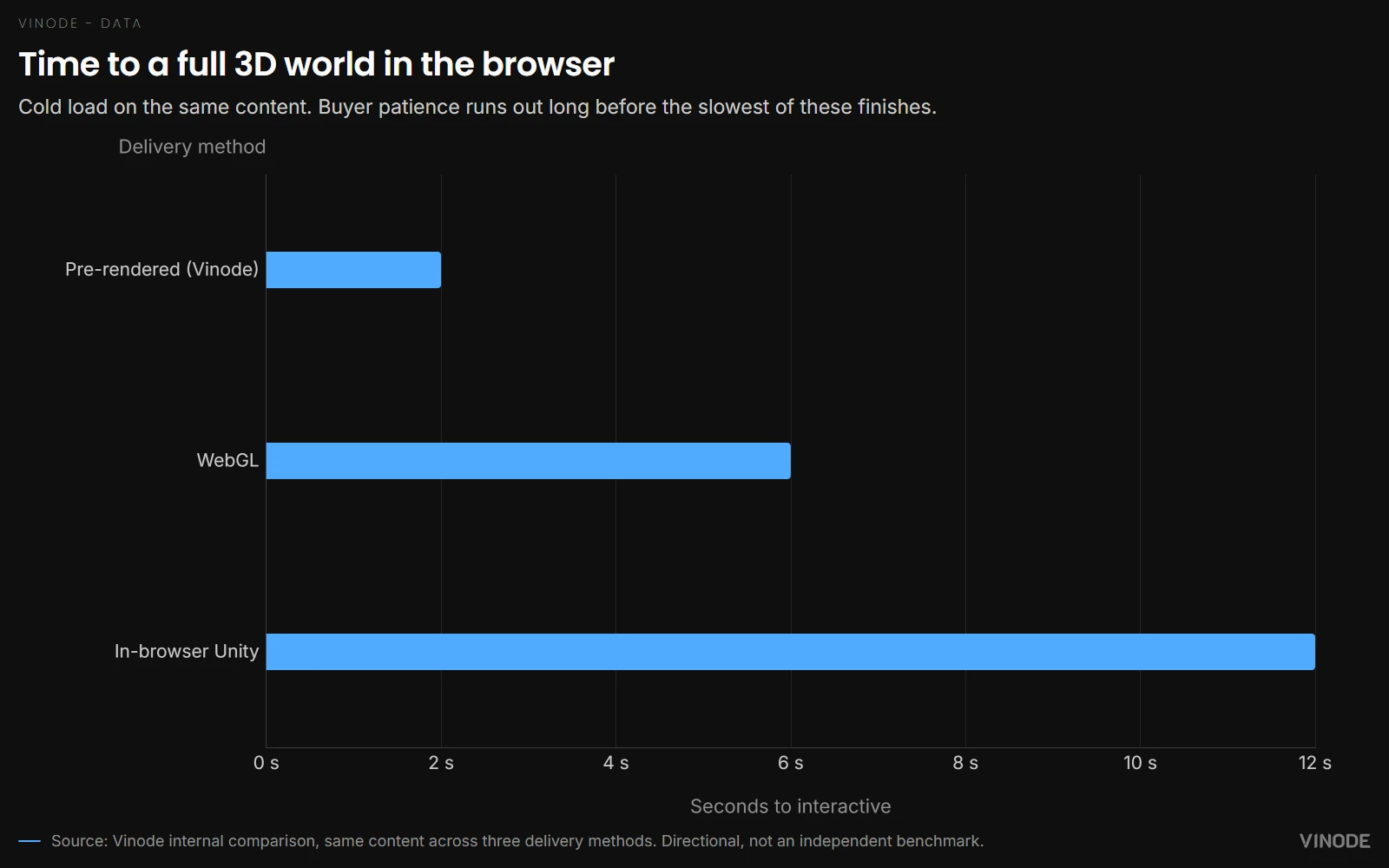
Pre-rendering moves the heavy computation off the device, so the scene opens on hardware that could never run a live engine. Vinode's own comparison puts a full pre-rendered 3D world in the browser in two seconds, against six for the same content in WebGL and twelve for an in-browser Unity build. Treat that as directional; it is an internal comparison, not an independent benchmark. But a twelve-second cold load in front of a client is an abandonment event, and the buyer's patience runs out long before the flythrough finishes loading.
Compute runs off-device, so a mid-range phone and a three-year-old gallery tablet load the same scene at the same speed.
"No app, just a link" is table stakes
Here is a claim that will annoy some vendors: paying a premium for "no app, just a link" is paying for the price of entry. Browser-based, no-download sharing is real and it matters, but 360° photo-tour tools have cleared that bar for years. It is table stakes. If a vendor's headline differentiator is that the buyer does not have to install anything, they are charging a premium for the floor everyone already stands on.
The install-and-update tax is still worth naming as its own condition. A native sales-presenter app that must be downloaded, kept current, and run on approved hardware is one more thing that breaks on the floor and cannot be forwarded as a plain link. Every release is a version the gallery tablet has not installed yet, and every buyer who cannot open it is a follow-up that never lands. The counter is not glamorous. It is just a URL that always points at the current build.
So if "no app" is table stakes, what actually separates one tool from another? The handoff.
The tool earns its keep after the meeting ends, in what the buyer opens on the drive home. If that link is a stripped, out-of-date PDF, you built a demo, not a sales tool.
The follow-up link decides the deal
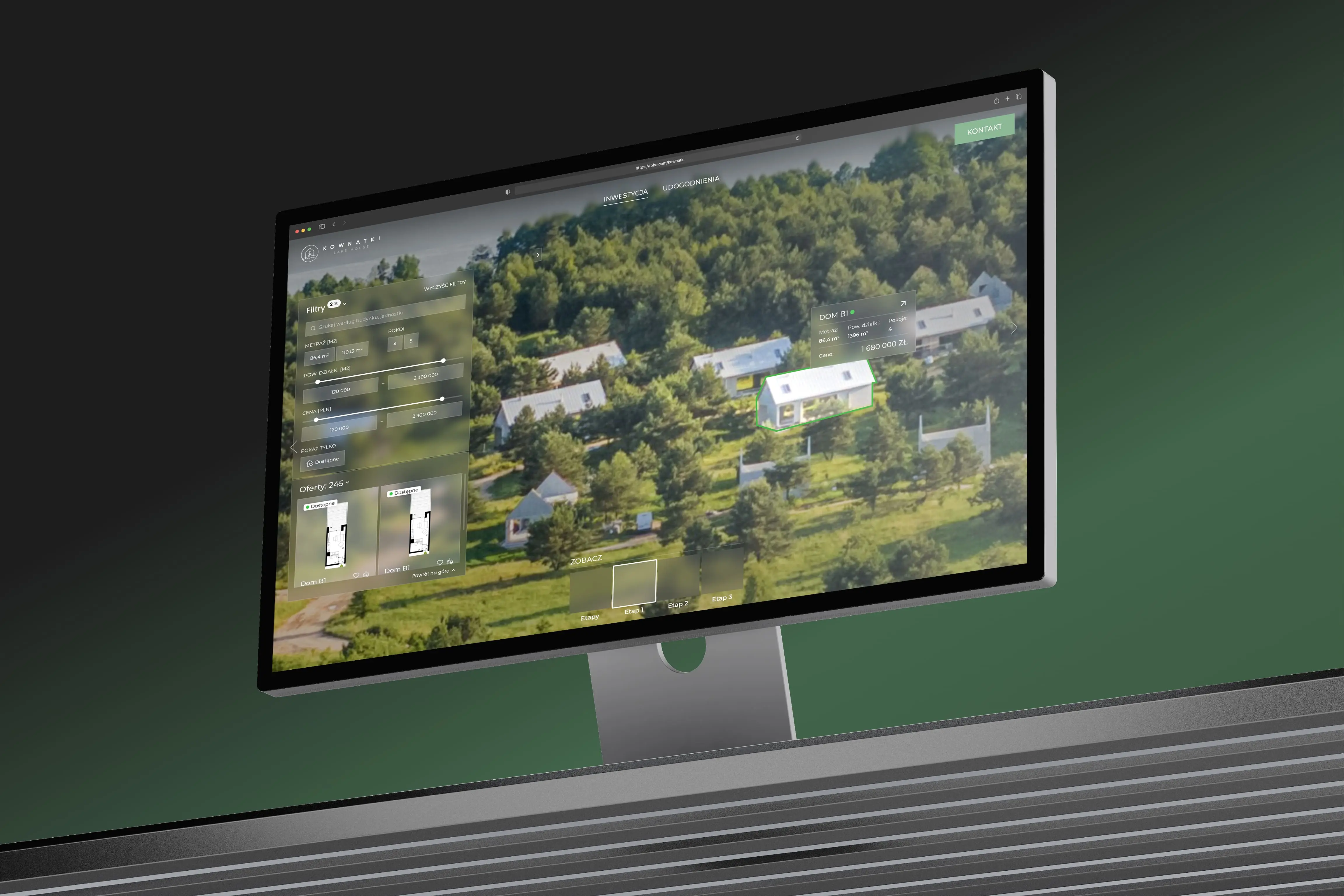
The follow-up link is the condition that outlives the meeting, and it is where most tools quietly fail. Start with what doing it right looks like. Kownatki, a development of 20 detached houses built across three stages, carries the plot, the layout, the price, 360° interiors, floor plans, and a downloadable house card in one link, with availability wired live across the three build stages from the back panel. A sold house never resurfaces on the link a buyer already has, and the sales team stops re-exporting PDFs every time a unit moves. The buyer opens the same interactive experience the rep just demoed, current as of the moment they tap it.
Now the usual version. A rep demos a unit as available, the buyer goes home to think it over, a colleague sells that unit, and the follow-up link still shows it for sale. The tool is now working against the deal. This is the moment most 3D tools hand the buyer a lesser artifact than the one they saw in the gallery: a set of static renders, a PDF, a link that no longer matches what is actually available. Keeping that link honest for weeks after the buyer leaves is the harder engineering problem, and it is the one most tools skip. It means the availability shown on the shared link has to change the instant a unit's status changes in the back panel, with nobody re-exporting or re-sending a thing.
The pull toward a live link only grows, because buyers increasingly want to explore on their own before they bring a rep back into it. Gartner's 2026 sales survey found that 67% of B2B buyers prefer a rep-free experience (Gartner). Read closely, that is a preference to self-serve through part of the journey rather than to cut the rep out of it, and a self-serve link that stays current supports exactly that: the buyer looks around unaccompanied, then comes back to the conversation knowing what is still for sale rather than working from a stale snapshot.
That self-serve return visit is where intent shows. On one of our developments, returning visitors' sessions ran nearly twice as long as first-timers' (~6.7 vs ~3.6 min): the buyer who comes back to a live link goes deeper, not shallower. Anonymized, from our own GA4.
Source: Vinode measurement - as of
One build for the site, the link, and the kiosk
Notice that the sales website, the follow-up link, and the offline gallery kiosk are usually treated as three separate builds, from three vendors, drifting out of sync at three different rates. A kiosk built for the show suite should be the same thing the buyer opens at home and the same thing the marketing site serves to a stranger. When one pre-rendered build is all three, there is nothing to reconcile, and the reps never have to wonder which version is current.
The honest tradeoff is that a single unified build is not always the best-of-breed answer to any one of those jobs. A dedicated kiosk product may offer richer touchscreen interactions, and a standalone marketing site may give a web team more freedom to experiment. Unification wins on the thing that actually drives adoption, that the whole team trusts one current source, but it costs you some of that specialisation.
The four-question stress test, before you commission anything
1. Worst-case connectivity
Will it run on launch-day gallery wifi shared by a crowd, and keep working when the connection drops mid-tour? If it needs a live stream, test it under your busiest hour.
2. Worst-case device
Open it on the oldest phone and the ageing gallery tablet you can find. A cold load past a few seconds will lose the buyer before the tour has started.
3. The install-and-update tax
Can a rep share it as a plain link with no download, and does that link always point at the current build? Anything that needs installing or updating is a step that gets skipped.
4. Data that stays current
Does the buyer's follow-up link show live availability, or a snapshot that goes stale the moment a unit sells? A stale link works against the deal instead of for it.
Buy for your worst sales day, not the demo
Reverse the usual order. Most buyers start from the demo, fall for the fidelity, and meet the operating conditions for the first time on launch day, with the room full. Start instead from the conditions you actually sell in, and buy the tool that holds up on your worst day. A tool that clears that bar gets used, and its fidelity becomes the payoff you collect once it has earned a place on the floor. The ones that end up dead on a laptop in the corner were rarely undone by their graphics, and no champions programme would have saved them. The demo simply hid the day the gallery was full.
Fine print worth knowing before you buy. The offline kiosk is a mid-tier deliverable and up, not part of the smallest package, so a six-unit project will not include it by default. The self-service editor that lets teams edit their own pages is rolling out, with release planned for Q3 2026, so treat it as near-term direction rather than something every client uses today. And there is no credible industry statistic for how often 3D sales tools go unused: the abandonment argument here is built from mechanics and from what reps actually do on the floor, not from a number nobody can source.
Test it on your worst phone and your flakiest wifi
Open a live Vinode project on the least capable device and the shakiest connection you have. That is the test that predicts if your reps will actually use it.

The Unit-Specific PDF a Buyer Actually Asked For
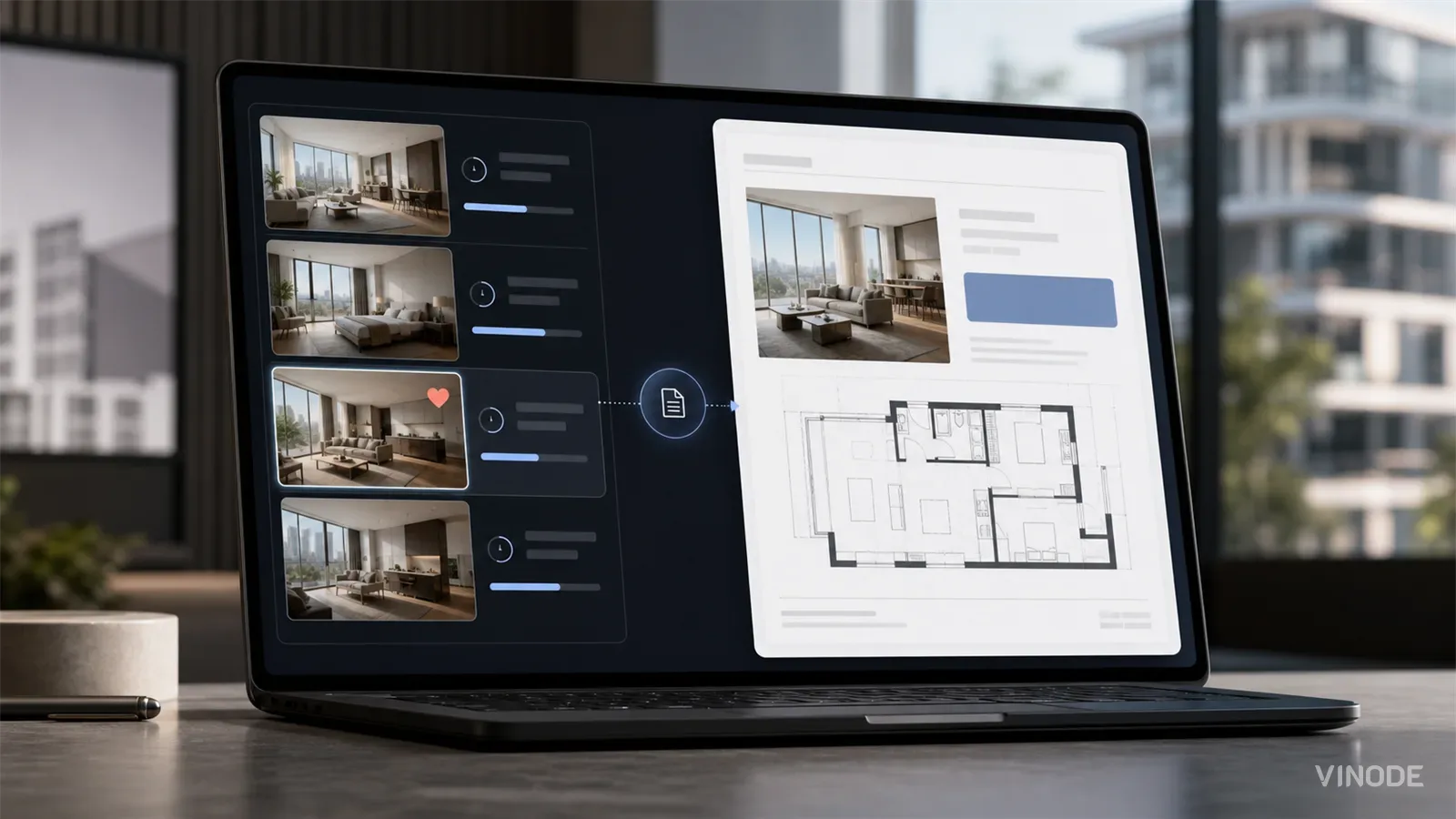
A buyer spends nineteen minutes on one two-bed, saves it, and gets the forty-one-page development brochure the next morning. Once a sales platform records the unit a buyer chose, the generic brochure becomes a decision to ignore that choice.

Expression of interest before release day: capture unit demand
640 names and no idea which side of the building they want. An expression of interest campaign pays off when the form is joined to the units each buyer explored, and each of these checks has a pass, a fail and a cost.

We measured when a pipeline crosses the presale line, not just whether it will
When GTHA opening-quarter absorption averaged 66%, the sold percentage was enough to forecast a presale crossing date. Then absorption fell to 17%. Three pipeline inputs produce the crossing date your lender asks for: stage-conversion rates, a cancellation haircut, and remaining inventory.