
Generic CRM vs a Purpose-Built New-Build Sales CRM
Key Takeaways
- Generic CRMs like HubSpot and Salesforce can model a unit, but only as a custom object you design, own, and maintain yourself.
- HubSpot gates custom objects behind its Enterprise tier at $150 per seat per month as of July 2026, so unit modeling starts at the top price.
- Building the objects still leaves the workflows unbuilt: availability synced to the public page, per-unit brochures, unit-view tracking, and discount approval.
- A purpose-built new-build CRM ships those workflows pre-wired, but it stays narrower and is the wrong buy when your company already runs on one general CRM.
The unit your CRM never learned to see
A sales lead at a residential developer opens the pipeline on a Monday with a simple question: which apartment did last week's most engaged buyer actually spend time on? The CRM shows a contact, an email thread, and a deal parked at 'proposal sent.' It does not show a unit, because no record in the system was ever built to represent apartment 4B in Building C as something you can filter, price, or mark sold.
Most CRM evaluations for new-build sales start from the wrong belief, and there are two versions of it. One says a platform as flexible as Salesforce obviously handles property, since it handles everything, so a specialist tool looks like a narrower and riskier bet. The other says HubSpot and Salesforce simply cannot do property, which is why niche tools exist. Both treat can it store a unit as the deciding question. It isn't. Each of them can represent a unit. The decision that actually costs money is what you have to build to get there, which price tier that sits behind, and which new-build behaviours you are still missing once you have built it.
Yes, you can model a unit. You just have to build it
Neither HubSpot nor Salesforce ships a native Unit, Building, or Floor object. You create them yourself as custom objects. The clearest proof that there is no out-of-the-box new-build model is that Salesforce's own admin training for real estate is a from-scratch build guide: it walks an admin through creating Project, Building, Floor, Unit, Payment Plan, Invoice, and Agent objects, then hand-mapping every field onto Unit, including sell price, area, and status (Salesforce Trailhead: Create a Custom Object). When the canonical document is a tutorial for assembling the model yourself, that is the evidence there is nothing to assemble it from.
This is not a criticism of the tooling. A general CRM is deliberately unopinionated about your domain, and custom objects are how it stays that way. But it changes what you are buying. You are not buying a new-build data model. You are buying the raw material and the right to assemble a model, then run it as an ongoing admin project. Someone designs the object graph, and someone keeps it maintained as the way you sell changes.
The tier where custom objects unlock; on the plans below it, an apartment can only be a generic deal (HubSpot pricing).
The modeling capability is a top-tier purchase
Here is the part that reshapes the budget. HubSpot's own knowledge base restricts custom objects to its Enterprise subscription; they are not available on Starter or Professional (HubSpot: Create and edit custom objects). And Sales Hub Enterprise lists at $150 a seat monthly as of July 2026, against $90 for Professional and $7 for Starter, each billed annually (HubSpot Sales Hub pricing). So representing an apartment as anything richer than a generic 'deal' pushes a developer onto the most expensive plan before a single unit is configured.
Salesforce is a different case, and its own edition-allocation docs let you pin it down without guessing. Custom objects are available from the mid-tier Professional edition, which permits 50 of them, and the Enterprise edition raises that ceiling to 200 rather than unlocking the ability to create one at all (Salesforce: Professional Edition Allocations). So the top-tier gate is a HubSpot-specific fact, not a general law: on Salesforce you can model a unit a tier earlier and cheaper. What holds across both vendors is the point underneath. Whatever edition you build the Unit object on, you have modeled the inventory and not yet built a single workflow that runs on it.
Objects aren't workflows
Suppose you build the model anyway. You now have a Unit object with statuses and relationships, and you still do not have what a new-build sales team touches every day. Those live at the workflow layer, above the data model you just finished building, and each one below is a separate build with no native equivalent in a general CRM.
Four new-build workflows you still have to build
Availability on the public page
A unit is free, reserved, sold, or promo, and that state has to appear on the marketing listing the moment it changes.
Discount-request approval
An agent asks for a concession and it routes for sign-off against an approval limit before anything is promised to the buyer.
The per-unit brochure
A document that reflects the buyer's selected unit, its live price, and its floor plan, generated on demand and never re-exported by hand.
Unit-view tracking
The record of which apartment a contact looked at, and for how long, so the sales lead's Monday question actually has an answer.
The seam a general CRM can't close
The hardest of these is availability sync, because it exposes a structural boundary in how the two systems relate. A CRM holds the record; the marketing website holds the listing. They are two separate systems, usually owned by two different teams. A unit you mark sold in the CRM does not un-list itself on the site. Someone has to build the connective tissue between them: a webhook or scheduled job that watches the Unit object, a field map from the CRM's status values to the states the site knows how to render, and handling for the awkward cases, a reservation that expires, a promo price that runs for two weeks, a unit pulled back from sold to available after a buyer drops out. That integration is now yours to keep alive for as long as you run the system.
The failure mode is quiet and expensive. A unit sells, the sync lags or breaks, the website still shows it available, and a buyer books a viewing on an apartment that no longer exists. Or the team stops trusting the site, falls back to a spreadsheet nobody else can see, and the public page drifts from reality until it is actively misleading. This is architecture, not a vendor failing. A general CRM was never meant to own your public pages, so the boundary stays real no matter how capable the tool is.
Purpose-built panels close the seam by binding the listing to the unit record directly, so availability, price, and galleries on the public page read from the same source the sales team edits (the pattern is covered in unit availability as a single source of truth and keeping the property page in sync). The same binding carries the configurable-unit rules and the discount workflow. In a tool built for new-build sales, the four workflows above ship as features rather than integration projects you own for years.
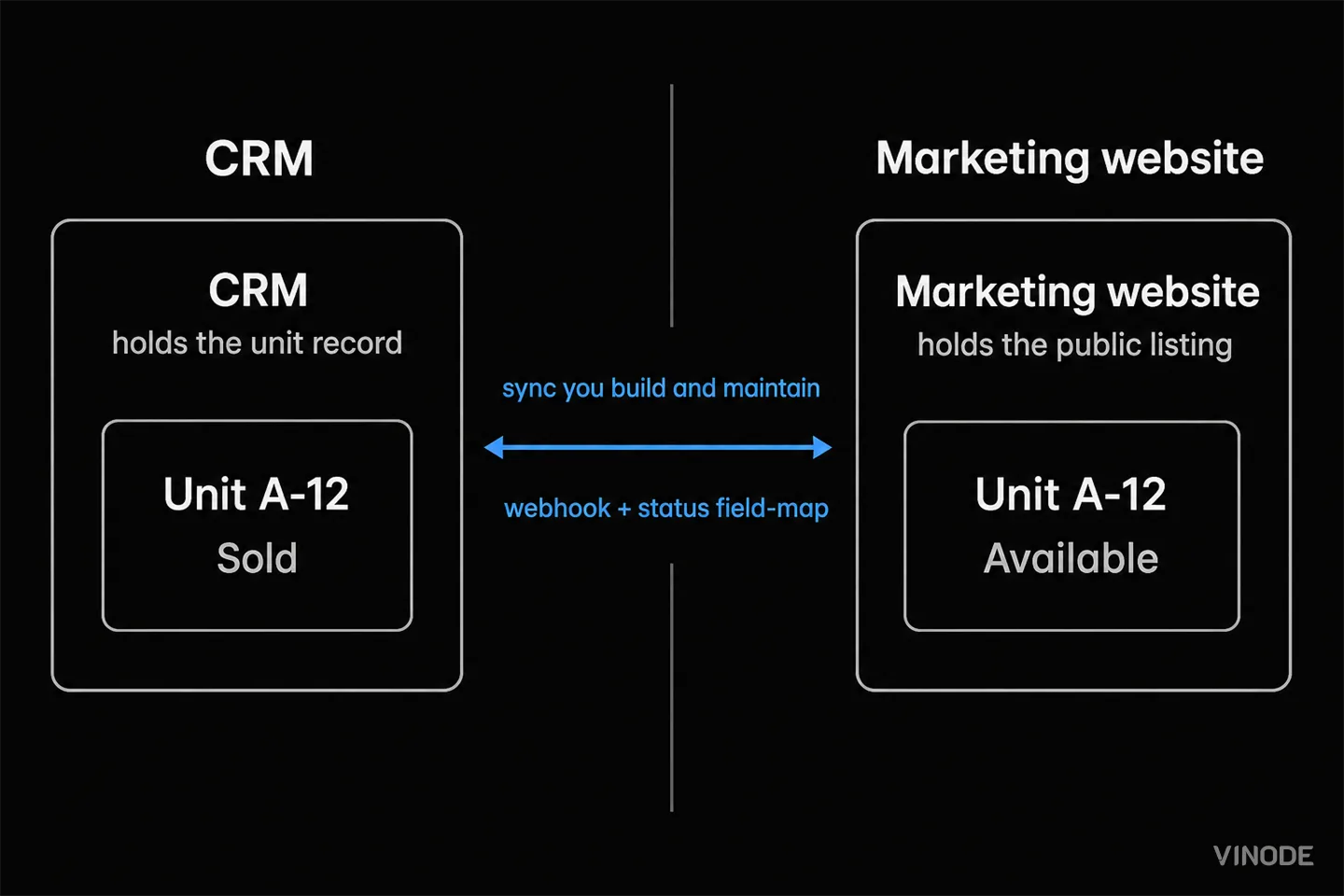
An availability-to-website sync you build yourself is not done when it ships. It has to survive every site redesign, every CRM schema change, and every new field the sales team wants live. Budget for years of upkeep, on top of the initial build.
When to keep the generic CRM
None of this is an argument to rip out Salesforce. There are real cases where extending the general CRM beats standing up a second system, and pretending otherwise would make the rest of this dishonest. If your whole company already runs on Salesforce, with finance, other business lines, and reporting all built on it, then a second system for property carries its own integration and training cost, and a purpose-built panel that plugs into what you already have fits better than a full switch. If you are a single small project with a handful of units on a shared spreadsheet, you may not need any CRM yet.
The purpose-built panel is narrower by design. Organized around the unit lifecycle, it will not stand in for a diversified sales org's CRM on the non-property work. That is the trade the buyer accepts: the new-build workflows pre-wired, in exchange for a smaller footprint. Wherever you land, the data-ownership and export questions still apply, which we cover in data ownership and lead attribution.
Score the workflows, not the fields
Change what the evaluation measures. The weak scorecard asks whether each CRM can hold a unit. Both can, and you will spend a demo confirming a yes you already knew. The choice that moves money is not feature presence but owned liability, and in our experience building the back panel, the teams who regret a CRM choice are the ones who scored the fields and forgot who maintains the workflows once the consultant leaves.
The recommendation follows from that. Keep the general platform's flexibility when your business genuinely spans many lines and needs it. Take the purpose-built panel when you sell units for a living and would rather those workflows arrive already wired than spend the next two years wiring them, then maintaining them, yourself. The parallel economics for the wider 3D experience are worth reading alongside this, in building or buying interactive 3D.
See a unit-first back panel in action
Availability, pricing, offers, and the public listing all running from one record, built for how developers actually sell.

The Unit-Specific PDF a Buyer Actually Asked For
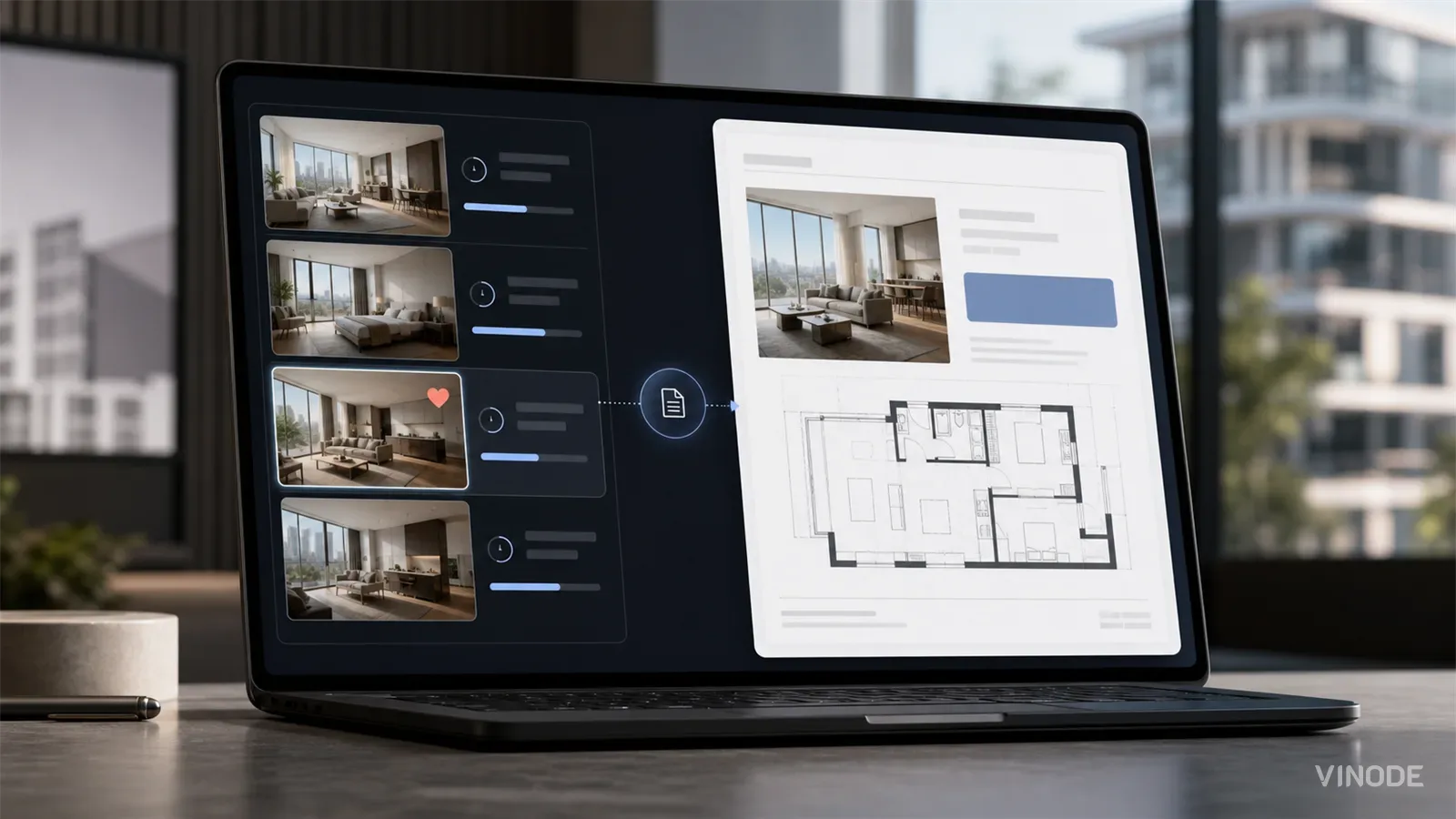
A buyer spends nineteen minutes on one two-bed, saves it, and gets the forty-one-page development brochure the next morning. Once a sales platform records the unit a buyer chose, the generic brochure becomes a decision to ignore that choice.

Expression of interest before release day: capture unit demand
640 names and no idea which side of the building they want. An expression of interest campaign pays off when the form is joined to the units each buyer explored, and each of these checks has a pass, a fail and a cost.

We measured when a pipeline crosses the presale line, not just whether it will
When GTHA opening-quarter absorption averaged 66%, the sold percentage was enough to forecast a presale crossing date. Then absorption fell to 17%. Three pipeline inputs produce the crossing date your lender asks for: stage-conversion rates, a cancellation haircut, and remaining inventory.