
Virtual staging vs interactive 3D for a new development (and when flat renders are enough)
Key Takeaways
- Rank the tools by what each physically requires, not by price, and the off-plan choice sorts itself out.
- Virtual staging isn't available off-plan, because it needs a finished room photographed empty, which doesn't exist yet.
- For an off-plan launch the shortlist is only flat renders or an interactive layer exported from the same model.
- Buy the render on a small or deadline launch, and add interactive when buyers must judge scale, compare many units, or decide from abroad.
A developer principal opens a search and types "virtual staging vs 3D rendering for off-plan units." The building isn't built. Foundations may not be poured. The assumption behind that search is that staging and 3D are two prices for the same job, and the only question left is which one buys more polish per dollar.
The search hides a catch, though. For a genuinely off-plan unit, virtual staging isn't the cheaper option; it isn't an option at all. Photo-based virtual staging starts from a photograph of a finished, empty room. Before handover that photograph can't be taken, so the technique simply has no input to work from.
Most comparisons rank these three by price and settle on "use both, at different stages." Sorted by what each one requires instead, they line up like this.
What each tool requires first
Photo virtual staging
Needs a built, empty room that has actually been photographed. It composites furniture onto that real photo, so it only becomes possible once the unit is finished and shot.
Flat CGI render
Needs only plans or a model. It draws the space before it's built, which is why it's the earliest off-plan asset you can make.
Interactive 3D
Needs the same drawing inputs a render does, plus a built, navigable experience on top. Same off-plan advantage as a render: no physical space required.
Because it works from a photograph, staging sits out the entire off-plan phase and re-enters only at handover, once a finished unit can be shot empty. When it does, label the virtually staged photos as staged. Under NAR's Code of Ethics guidance, virtually staged listing photos should be clearly labeled so buyers get a true picture. It's both an ethics obligation and a trust cost with people who will eventually stand in the finished room.
Why the stills and the walkthrough are one purchase
Strip staging out and the off-plan decision gets smaller and more honest. Two tools remain: a set of stills, and a navigable experience layered on top of them.
The common mistake is treating those two as separate purchases, a stills budget over here and a walkthrough budget over there. In a model-built pipeline they aren't separate at all. The stills are camera angles inside the same 3D scene that powers the navigable experience. You model once and export both. So the question isn't which of the two to buy. It's whether this particular launch needs the navigable layer sitting on top of the stills you're already getting.
The real question was never renders versus a walkthrough. It's what you need the buyer to work out on their own, and whether a flat image can carry that weight.
When flat renders are genuinely enough
A vendor that sells interactive 3D would rather not say this out loud, so I will: plenty of launches don't need the navigable layer, and paying for it would be waste.
Flat renders alone are the right call when:
- You're on a tight timeline and need a single hero image for a brochure or a planning submission, where a full buyer-facing experience would be overkill.
- The development is very small, six units or fewer, where one rep holds the whole inventory in their head and a phone call moves faster than any tool. Our own take on small-development tooling makes the same concession in interactive floor plans and the sales cycle.
- Budget forces a single early asset for a teaser or an ad, and one strong still does that job.
If that describes your launch, buy the render, skip the walkthrough, and revisit the call when the project grows.
When interactive 3D earns its build
Interactive earns its keep the moment a buyer has to do something a single still can't help with. Three signals it's worth the extra build:
- Buyers must read scale and orientation. A navigable space lets someone feel how a corner unit sits against the courtyard, or how a hallway turns before a bedroom. You understand a room better by moving through it than by staring at one frozen frame.
- There are many units to self-qualify across. When a development runs to hundreds of units, buyers need to filter and compare on their own time. A large, phased project like +Colonia, a 515-hectare development near Colonia del Sacramento in Uruguay, cannot be sold from one hero render.
- Buyers can't physically visit. The overseas and remote audience that a Riyadh development like Safa Al Fursan or a Dominican Republic resort like Tropical Mirage Bayahibe draws has to decide from wherever they already are, which makes the navigable walkthrough the closest thing they get to a site visit.
Interactive doesn't have to mean heavy
There's a fair objection here. Interactive 3D, the assumption goes, means a heavy real-time engine that renders every frame on the buyer's phone, so you trade load time and device compatibility for the navigable layer. For a lot of tools, that trade is real.
It isn't fixed, though. Vinode pre-renders the 3D ahead of time and streams it as video instead of computing it on the buyer's device. The experience stays navigable, but the phone only has to play a video, so it loads fast on low-powered hardware and even runs offline as a kiosk. The full engineering case lives in pixel streaming vs pre-rendered 3D and why pre-rendered beats real-time. The point for this decision is narrower: weight alone isn't a reason to default to flat stills.
Vinode's own comparison clocks the pre-rendered stream against 6s for a WebGL build and 12s for in-browser Unity.
Where renders, interactive 3D and staging each fit
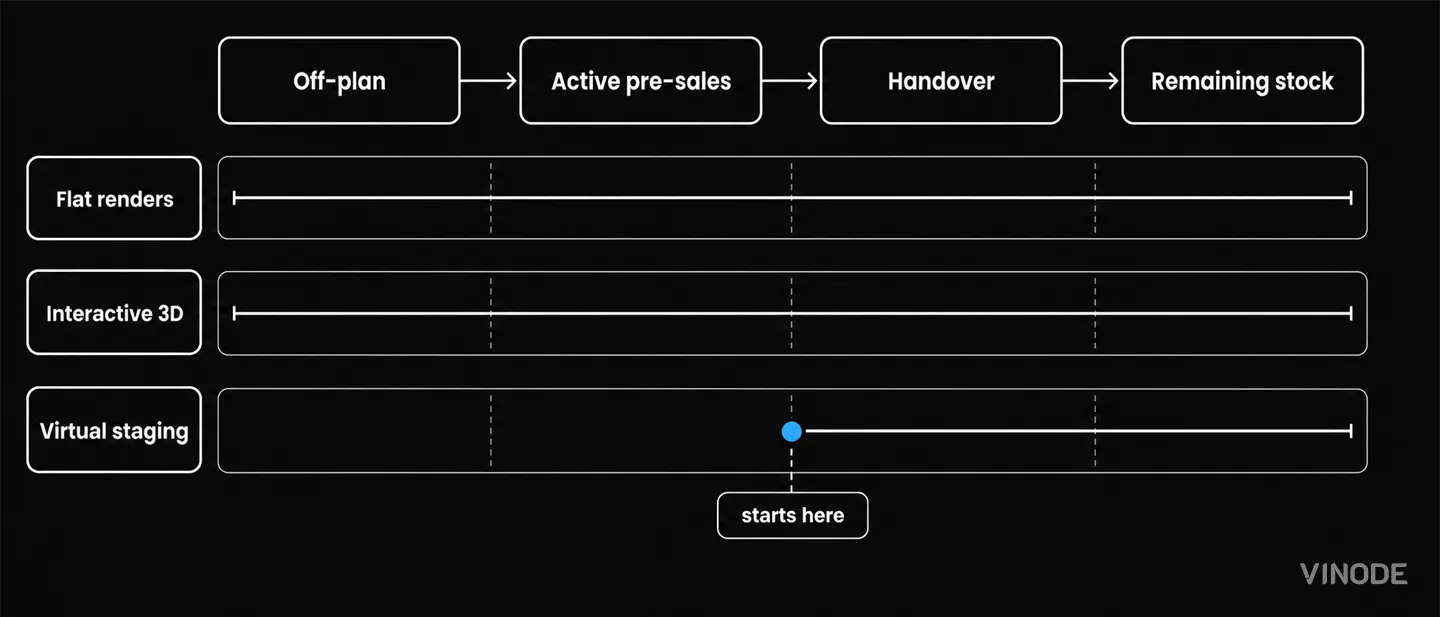
Line the tools up against the project timeline and each one has a stage where it earns its keep.
- Off-plan. Flat renders sell the vision. Interactive 3D builds confidence once pre-sales open. Staging can't run yet, because no finished unit exists to photograph.
- Active pre-sales. Interactive 3D carries the load: navigation, unit filtering, scale-reading, and reach to remote buyers.
- Handover. Finished empty units can finally be photographed, so virtual staging re-enters to furnish them fast, with the disclosure label attached.
- Remaining stock. Staging plus the interactive assets you already built keep selling the finished reality.
Staging never left the toolkit. It was just waiting for a room.
Choosing renders or interactive for this launch
For anything genuinely off-plan, only two assets are ever on the table: renders or interactive 3D. Reach for a render when you need one hero image on a deadline, or when the development is small enough that a rep holds the whole inventory in their head. Reach for interactive when buyers have to read scale, self-qualify across hundreds of units, or make the call from another country. Work the assets in that order and the decision mostly makes itself.
See an off-plan project open on your own phone
Explore a live Vinode development, judge the scale-reading and the load speed yourself, then talk to us about a custom quote across the three size tiers.

The New-Build Sales Platform Checklist
Two agents reserve the same unit from two laptops, both reservations go through, and the listing stays available for eleven minutes. Test one live unit through inventory, availability, attribution and discount approval before you choose a platform.

AI Search Is Shrinking the Click: What Property Developers Should Measure Instead
AI answers can remove the visit before it happens. Keep tracking search traffic, but judge it by what follows: qualified arrivals, unit exploration, contextual enquiries and reservations.
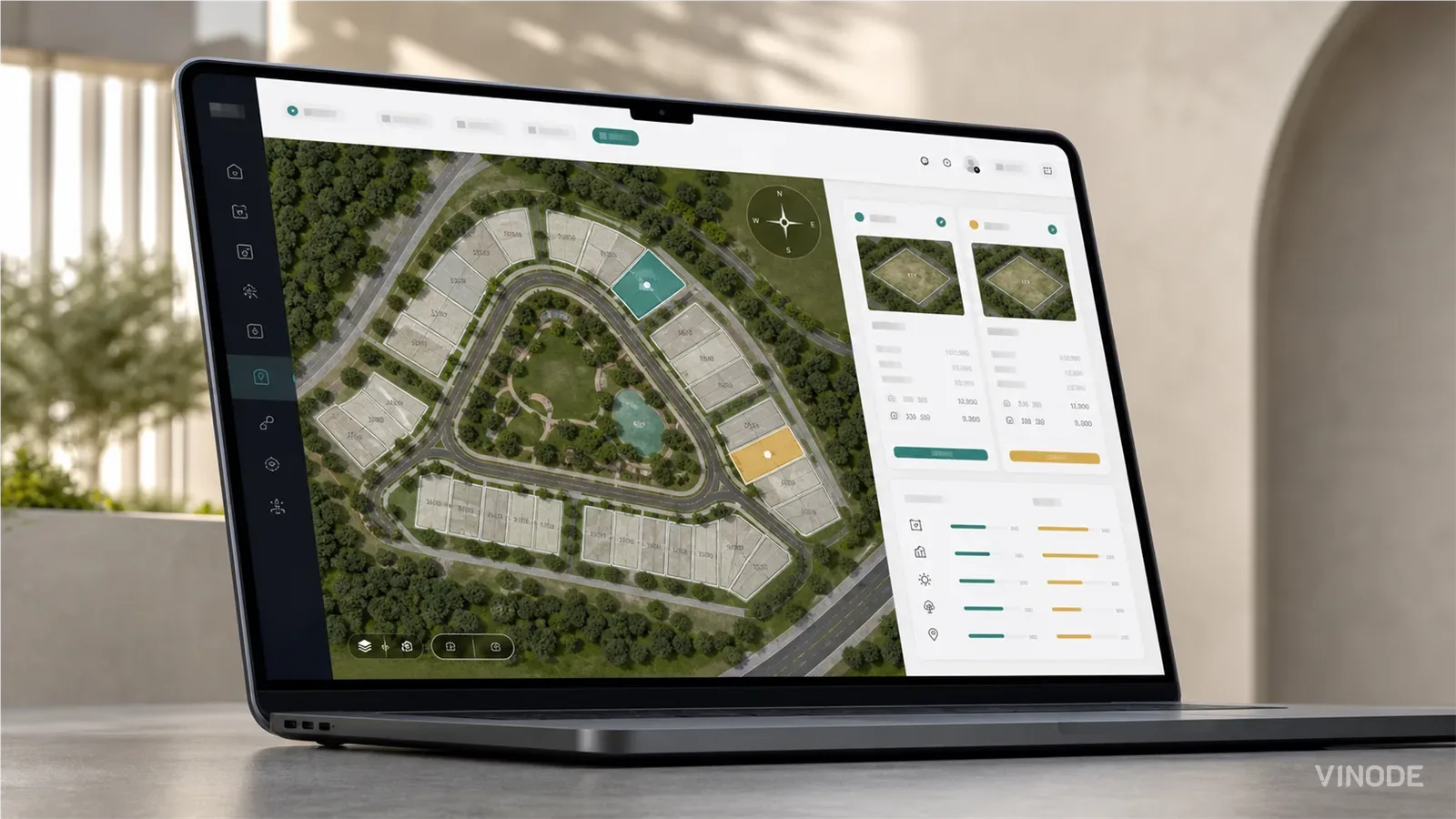
How buyers pick a plot on a housing development they have never walked on
On a six-house estate a clickable plot map does the whole job. On a varied estate the buyer still calls to ask which way the garden faces and what is behind the fence. What a plot finder has to show so that call becomes a reservation, and who at the developer keeps it current.